Icon of program: Scrble Ink

Scrble Ink for Windows

  • Paid
  • 4.4
    64
  • 47.3K
  • Vvaries-with-device

Joe Wainer

Updated 4 years ago

Freehand writing application for PC

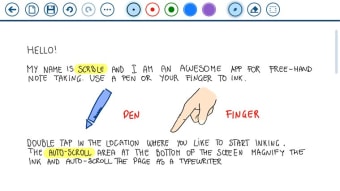
Scrble Ink is a premium productivity application developed by Claudia Wey for PC. It is a handwriting tool that can be used on Windows tablets. Users can write or draw with their fingers, but a digital pen is advisable for those that need accuracy and precision for work.

Just like with WRITEit or ritePen, Scrble Ink enables users to write or draw on their touchscreen-equipped devices using a variety of different tools and editing options. It also supports importing text or PDF documents for annotations, as well as converting handwriting to text.

How does it work?

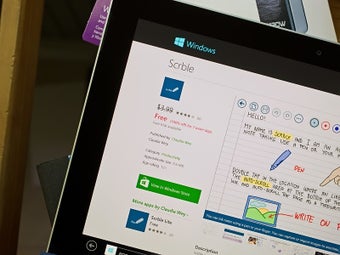
Scrble Ink is a major update to Scrble, which was made by the same developer for Windows 8 devices. This new version fully supports Windows 10 and can be used on any touchscreen-equipped PC that is running it, either with your fingers or with a digital pen. It offers 5 paper types, each one useful for purposes like a math sheet for teachers or a music sheet for musicians.

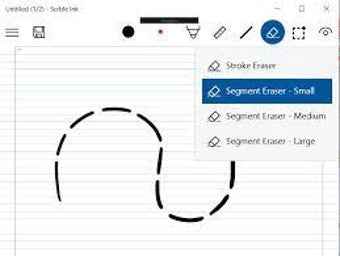
Scrble Ink lets you import text documents or PDFs to annotate them. There are 4 pen types along with various colors to choose from. If you need better precision, there are ruler and protractor tools to help you out. There are 34 geometric shapes that you can utilize for your documents and drawings. You can even convert your handwriting (ink) to text for use with other documents or apps.

While it offers different pen types, the app does not detect pressure or tilt angles if you use a digital pen with it. Also, if you're interested in checking it out, there is no free version or a trial version to see if it will work well with your devices or suit what you will be using it for, which is an odd omission considering its asking price.

A worthy update to the original

All in all, if you tried the previous Scrble app before and you were left wanting more features and a better experience, Scrble Ink handily delivers on those in this much-improved version. It's intuitive to use, offers plenty of tools and features, and can now run on pretty much any Windows 10 PC with a touchscreen. However, it doesn’t have a trial version but with its updates, it’s worth buying.

Joe Wainer

    Joe Wainer is a content writer with a strong interest in technology and software. He enjoys exploring new apps, games, and tools, translating his findings into reviews that are clear and accessible. His background also includes coding projects, adding practical insight to his evaluations.

    • Pros

      • 5 paper types
      • 4 pen styles
      • 34 geometric shapes
      • Importing text and PDF documents
      • Ink to text conversion
    • Cons

      • No free or trial version
      • Unable to detect pen pressure or tilt angles
     0/3

    App specs

    • License

      Full

    • Version

      varies-with-device

    • Latest update

    • Platform

      Windows

    • OS

      Windows 10

    • Language

      English

    • Downloads

      47.3K

      Last month's downloads

      • 983
    • Developer

    Program available in other languages


    Icon of program: Scrble Ink

    Scrble Ink for PC

    • Paid
    • 4.4
      64
    • 47.3K
    • Vvaries-with-device

    User reviews about Scrble Ink

    Have you tried Scrble Ink? Be the first to leave your opinion!

    Add review

    You may also like

    Alternatives to Scrble Ink

    Explore Apps

    Latest articles

    Laws concerning the use of this software vary from country to country. We do not encourage or condone the use of this program if it is in violation of these laws.
    Softonic

    Is Scrble Ink safe?

    Score result: Clean

    This file passed a comprehensive security scan using VirusTotal technology. It is safe to download.

    • Virus free
    • Spyware free
    • Malware free
    • Verified by Security Partners

      VirusTotal logo

    Scan Info

    Last scan
    Monday, January 15, 2024
    Scan provider
    VirusTotal

    Softonic security commitment

    Scrble Ink has been thoroughly scanned by our advanced security systems and verified by industry-leading partners. This file comes from the official developer and has passed all our security checks, showing no signs of viruses, malware, or spyware. For more information, visit our Security and Trust Center